A ham radio log you keep yourself
qsonaut stores your contacts on your own computer. No account to create, nothing on someone else's server. With several computers, each has the same log, and changes move between them on your home network or over the Internet.
macOS, Windows and Linux. iOS and Android versions are planned.
How it differs
Your log stays with you
No account, no cloud
The log is a database on your computer. No registration, no sign-in, and no qsonaut server holding your QSOs.
One log on several computers
The travel laptop and the shack computer both hold the whole log and work offline. When they connect, they swap changes. Each one is also a backup of the other.
Awards counted locally
How many DXCC entities, POTA parks or WWFF areas you have, the program works out from your log. No need to upload it anywhere.
Synchronisation
Several computers, one log
You pair computers once, with an eight-digit code. From then on they exchange changes by themselves: on the same network or over the Internet.
- The connection between your devices is encrypted.
- Over the Internet it works without port forwarding or router setup.
- If the same contact is changed on two computers, nothing is overwritten silently — you pick which version stays.
- Every correction has a history, and deleted QSOs go to the trash.
Award programs
Award progress with every QSO
A program is a short file with an award's rules: what counts and how many you need. qsonaut works it out from your log and tells you at entry whether a contact is new.
- Ready-made: DXCC, POTA, WWFF (SPFF), PGA and VUCC 6 m, with lists of what is missing.
- Once a program is on, its fields appear in the entry line.
- Write your own in a few lines of YAML and sign it in the app.
- ADIF export to a program's rules, e.g. an activation log split by park and day.
format: hamrule/2
id: community.vucc.6m
name: VUCC · 6 m
role: participant
filter:
  bands: [6m]
  confirmed_only: true
scoring:
  points: 1
  unique_by: [gridsquare]
requirements:
  minimum_score: 100
This is a program counting confirmed 6 m squares.
In practice
Station setups
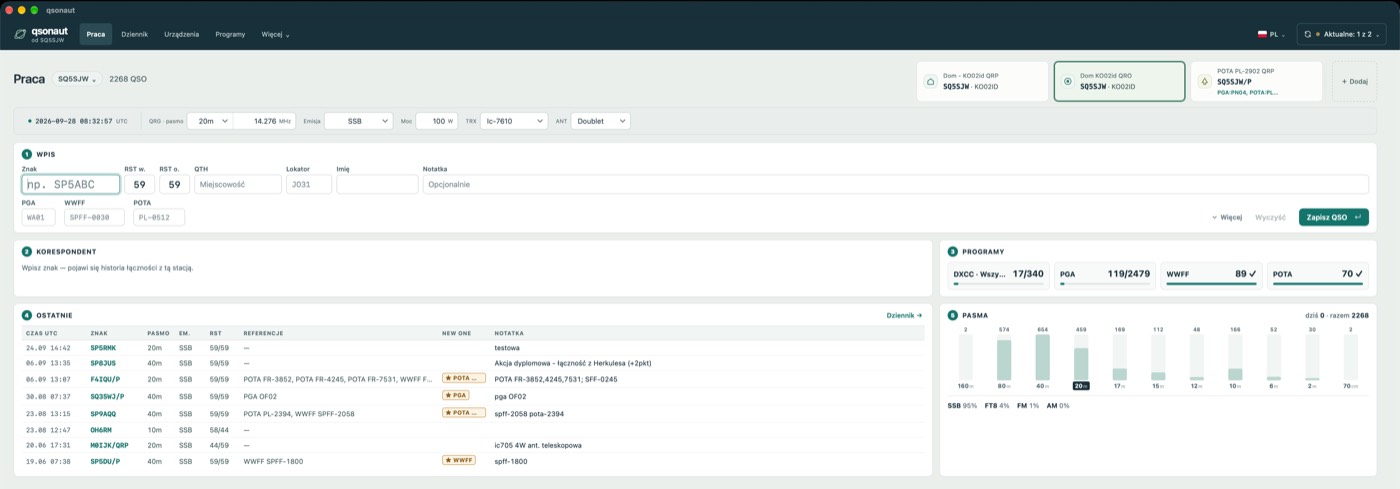
A setup is your station's saved details: callsign, locator, rig, power, activation reference. Switch with one click, and every QSO gets the details without retyping.
A POTA park, a WWFF area
The “SQ5SJW/P · PL-2902” setup carries callsign, locator and reference. You type the call and reports. A counter shows how many QSOs the activation still needs, and park-to-park is marked by itself. Back home, export ADIF by park and day.
PGA, POTA, SPFF from home
Enter the other station's municipality or park and see at once whether it is a new reference and which contact with it this is. With the directory loaded you also see what is still missing.
QRP and QRO
“Home QRO” with an IC-7610 at 100 W, “Home QRP” with an IC-705 at 5 W. Change rig and antenna on the bar; power and equipment go into every QSO and into ADIF.
Squares, Es, digital modes
QSOs from WSJT-X, JTDX and MSHV land in the log by themselves. New squares are marked, including ones new on the band, with distance, bearing and propagation.
Laptop in the field, computer at home
In the field you log offline. Back home the laptop connects to the home computer and swaps changes. Away from home, sync over the Internet.
Serial, exchange, rate
A contest setup numbers contacts, records the received exchange and tells you whether a station is already in the contest log. The 10- and 60-minute rate is on screen.
Also
What else is inside
ADIF import and export
Before importing you see what is new and what is already in the log. Export everything, search results or selected QSOs.
QRZ.com and HamQTH
Name, QTH and locator fill in by themselves, only into empty fields. Answers are cached.
QRZ Logbook
Send selected QSOs to your QRZ logbook and check confirmations.
QSL files
Confirm contacts with another qsonaut user by a signed file, no middleman.
WSJT-X, JTDX, MSHV
FT8, FT4, Q65, MSK144 log themselves. Works alongside GridTracker too.
Map
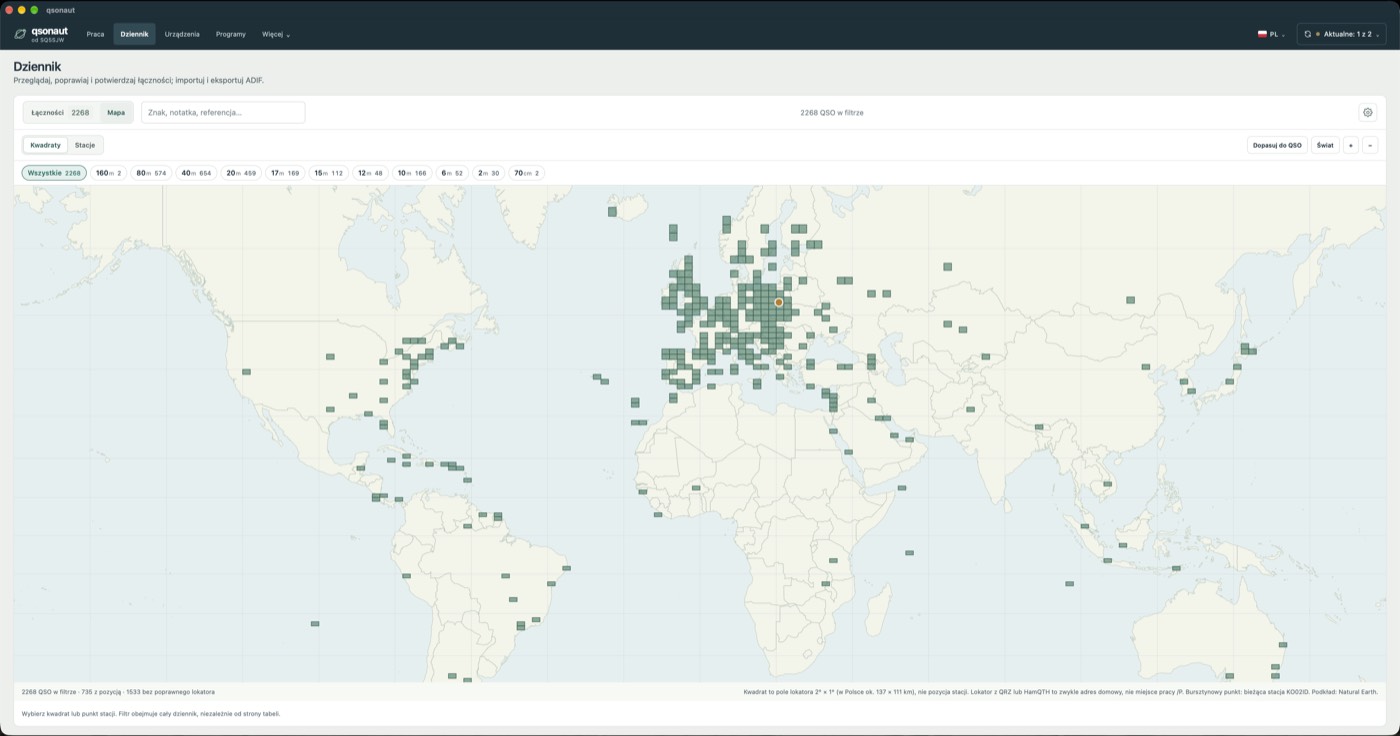
Squares or stations on a map, a band filter, distance and bearing at entry.
Entry history
Every correction is recorded; you can go back to an earlier version.
Recovery kit
The log's key in a passphrase-protected file. Lose a computer — add a new one, cut off the old.
English and Polish
Switch the language in the top bar.
About
A few words from me
qsonaut is made in Poland. I write it for my own station: I wanted a modern log that needs no account and does not keep my contacts on someone else's server. I share it because it may be useful to others too.
The program is free. I may open the code one day. Phone versions are planned.
I am not a contester or a keen activator. If you operate differently and miss something, tell me — I will gladly listen. — Marcin, SQ5SJW
Download
macOS, Windows, Linux
How to install and what to do on the first start is in the guide.
Once a day the program checks for a new version, sending only its version and system, with no identifier; the counts are on the statistics page. You can turn this off in Settings.